- Last tested 2026 Aug 30 -
Replicant is an archive of scripts that builds a lightweight, keyboard-centric desktop in Arch with DWM, ST, and polybar
In September 2026, Replicant v1(Xorg) will have a frozen config and be deprecated for Replicant v2(wayland)
Purpose
A clean, fast, lightweight system crafted for the cyberdeck
This project may interest you if you
-
would like to experiment with Arch
-
are averse to building Arch manually
-
have struggling older hardware
-
would enjoy a faster OS
-
game
Builds in ten minutes
Is it safe?
Archive integrity is verified in four increasingly paranoid ways by checking:
- archive hash against CHECKSUM
- archive hash against the checksum on archive server
- archive hash against the checksum in github repository
- package's gpg key signature
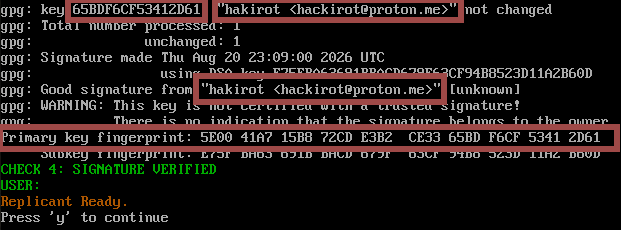
Optionally verify the script is executing key verification before installing:

Ensure this fingerprint is present when confirming
5e00 41a7 15b8 72cd e3b2 ce33 65bd f6cf 5341 2d61
Installation
Note: I recommend doing this first in a virtual machine or watching my youtube demo. [upcoming]
Note: When performing these steps on hardware directly, leave the ethernet connected to prevent having to reconnect and manually resume the install process after the reboot
After booting into live Arch Install Media, type "archinstall", press enter.
This step is to generate archinstall configuration files ONLY. Do not select "Install" in the archinstall menu.
Configure the following options below within the archinstall menus by entering each menu option, performing the steps, then selecting Back, or Save and Exit. Whichever is appropriate.
- In Mirrors and Repositories->Select Regions, select your region and return to the main menu
- In Disk Configuration->Partitioning->Use a best-effort default partition layout, and select the disk you wish to install Arch into. ext4 is the standard filesystem for Linux.
- In Hostname, name your system
- In Authentication->User Account->Add a User, create your username and password. You must be a superuser. Create your root password here as well, then save and exit.
- In Profile, select Xorg
- (Optional) In Applications->Bluetooth/Audio, decide whether you would like your system configured with bluetooth and audio (probably yes). For Audio, select pipewire.
- In Network Configuration, select Copy ISO network configuration to installation (Prevents having to reconnect and resume manually)
- In Timezone, select your timezone
- Save Configuration->Save user configuration (including disk layout), type '.' (a single period, no quotes) and press enter. Confirm and choose not to encrypt (default choices).
- Save Configuration->Save user credentials, type '.' (single period again, no quotes), press enter. Confirm and again choose not to encrypt.
- Abort
- Back in the terminal, confirm that user_configuration.json and user_credentials.json exist by typing ls and [enter]
Finally, this command installs the system after running internal verification checks
curl --proto '=https' https://www.hakipaks.org/replicant/start | sh
Note: This process is very sensitive to any peripheral inputs and will likely error if keys are pressed.. or even if the mouse is moved. In fact, best to not even have a mouse plugged in until it's done. The tiger will reiterate this sentiment (no touchy).
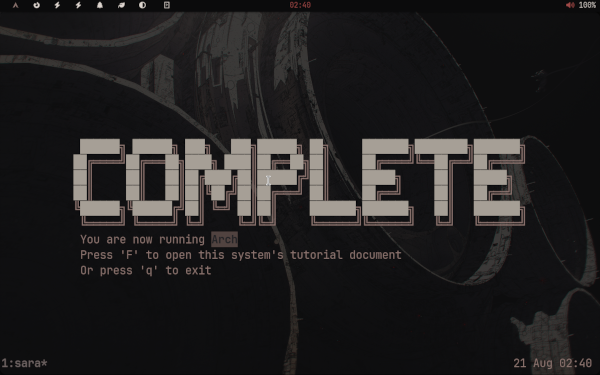
The system is ready when you see this:
Detach by Amir Zand
Let me know if any oddities occur. Enjoy Arch.
See getting started for basic usage